PC Build Service vs DIY: Which Route Fits Your Build
A PC build service hands you a tested, working machine with one place to go when something fails. DIY gives you full control of every part, and you pay for it with your own time and your own troubleshooting. For most buyers the deciding factor is not the sticker price. It is who carries the risk of a dead part, a bent pin or a machine that will not post on day one. Digiwrld’s custom PC build service starts from $800, and this guide shows how to decide whether that route or DIY suits your build.
TL;DR
- DIY avoids the assembly fee, but you pay in time, research and risk. PCWorld describes it as paying for assembly with your own time.
- With DIY, each part carries its own manufacturer warranty, and you diagnose which one failed. A builder works as a single point of contact.
- A hired build makes the most sense when you want a working machine quickly, have no spare parts for testing, or rely on the PC for work.
- Before paying anyone, get an itemized parts list with exact part numbers, written substitution rules and written return terms.
- Digiwrld builds custom PCs from $800 and also sells GPUs such as the RTX 5070, with a live inventory so listed items are in stock.
Table of Contents
- What each route actually means
- Cost: what you are really comparing
- Time and experience: the honest first-build picture
- Warranty and support: one contact or many
- When hiring a builder makes sense
- What to check before you hire anyone to build your PC
- DIY, step by step, and where a service takes over
- Where Digiwrld fits
- Ready to order a build
- FAQ
- Sources
What each route actually means
DIY means you choose the parts, buy them, fit them in the case, update the BIOS if needed, install Windows and test the result. PCWorld’s 2026 guide lists these same stages: planning, buying components, assembly, then BIOS, OS and testing.
A build service means someone else does the assembly, configuration and testing. Intel’s guide to pre-built, custom and DIY PCs describes the custom route as component-level selection with expert assembly, with warranties and phone support that vary by vendor, and sometimes a lead time before the system ships.
The BIOS is the low-level firmware that starts the machine before Windows loads. A fresh board sometimes needs it updated before it recognizes a newer processor, which is one of the steps first-time builders hit unexpectedly.
Cost: what you are really comparing
The assembly premium is smaller than many buyers expect, and it shrinks as the build gets more expensive. Tom’s Hardware found the gap between a parts-built PC and a similar ready-made system ranged from about $100 to $500, with the difference narrowing at higher price points. Digital Trends priced a $1,900 gaming PC against a comparable DIY build at $1,500 to $1,700 with Windows 11 Home, and noted the saving is not always massive.
Those figures are snapshots from 2019 and 2024. Component prices move constantly, so rebuild any comparison from live prices before you decide.
The fair way to compare is to list every cost on both sides:
| Cost item | DIY | Build service |
|---|---|---|
| Parts | You buy each one | Sourced by the builder |
| Assembly labor | Your own hours | Included in the service |
| Windows license | You buy it | Set up as part of the build |
| Tools, cable ties, thermal paste | You supply them | Handled by the builder |
| Failed or incompatible part | You diagnose, ship and wait | Single point of contact |
| Support after handover | Forums and manufacturers | One provider |
Reusing parts you already own changes the math. Tom’s Hardware notes that carrying over an existing case, drive or power supply widens the DIY price advantage considerably. If you are starting from nothing, the gap is narrower.
Time and experience: the honest first-build picture
PCWorld compares a first build to assembling an Ikea kitchen: daunting, but manageable for most people who do their research and watch video guides on cable routing. That is a fair description of the work. It also means a first build is a project, not an afternoon.
Three places where first builds go wrong:
- Static discharge. PCWorld’s first-build tips say to discharge static by touching exposed metal on the case before handling components.
- Heavy graphics cards. PCWorld’s guide notes the card needs bracing to protect the PCI Express slot, the long connector on the motherboard that carries it.
- Parts arriving at different times. PCWorld advises ordering so everything lands inside the standard return window. A part that fails after the window closes becomes a warranty claim instead of a simple return.
A professional build removes all three from your plate. The parts are assembled and tested together, so a bad part is found before the machine reaches you.
Warranty and support: one contact or many
This is the clearest difference between the routes. Kingston’s guide to building versus buying a gaming PC points out that DIY has no single point of contact: every part has its own manufacturer warranty, and if something fails you work out which component is at fault, then handle the return with that manufacturer. Digital Trends adds that a self-built PC has no warranty on the build itself, only on the individual parts.
Intel makes the same point: DIY buyers probably will not have system-wide support. Custom builders often offer phone assistance, with warranty terms that differ by vendor.
In the US, written warranties on consumer products fall under the federal Magnuson-Moss Warranty Act. The FTC’s guide to federal warranty law explains that the Act covers written warranties and does not itself require a business to offer one. So read what a builder promises in writing, because that document defines your coverage.
When hiring a builder makes sense
Hiring is the practical choice in these situations:
- You need it working soon. Parts research, deliveries and troubleshooting all take days. A service compresses that.
- The PC earns money. Streamers, editors and small businesses lose more to downtime than they save on labor.
- It is a high-end build. Expensive GPUs, tight cases and modern power connectors leave less room for error. The cost of a mistake rises with the price of the parts.
- You want one place to call. A builder owns the whole system, not a pile of separate warranties.
- You want help choosing parts. Compatibility between CPU, board, memory and cooler is where most planning errors happen.
DIY suits someone who enjoys the process, has time to research and has parts to reuse. It is also the route where you learn the machine inside out, which Kingston notes makes later upgrades and fixes easier.
Gamers who reach this point often want both: a machine built to their spec and a place to return to afterward. That is the case for a service that also handles repairs and software.
What to check before you hire anyone to build your PC
Whoever you choose, get these points in writing before you pay a deposit. They follow LaptopJudge’s guidance on custom assembly:
- Exact part numbers. A useful quote names the manufacturer SKU for the motherboard, CPU, memory, SSD, graphics card, power supply and cooler. Broad labels like “32 GB DDR5” or “850 W Gold” are not enough.
- Substitution approval. Any swap of a listed part needs your written approval.
- Compatibility. Confirm the motherboard supports your CPU and ships with a suitable BIOS version, that the memory profile runs at the advertised speed, that the GPU power cable type matches the power supply, and that the card fits the case.
- Return terms. Ask who pays return shipping if the finished system is faulty.
- Testing. Ask how the machine is tested and for how long.
- Itemization. Ask for parts and labor listed separately, so you can see what the service fee covers.
After delivery, compare the specs Windows reports and the physical labels on the parts against your invoice. Keep serial numbers, photos and packaging until you are sure everything is right, since warranty claims rely on them.
DIY, step by step, and where a service takes over
If you do decide to build yourself, the routine is the same every time:
- Plan the parts. Check CPU and motherboard socket compatibility, memory type, power supply wattage, GPU length against the case and cooler height. Mistakes here are the most expensive ones.
- Order together. Time purchases so every part arrives inside the return window.
- Prepare the motherboard outside the case. Seat the CPU, cooler mounting, memory and an M.2 SSD before the board goes in. Touch bare case metal first to discharge static.
- Mount and cable. Install the board, power supply and storage, then route cables before fitting the GPU, bracing it so its weight does not strain the slot.
- First boot and BIOS. Update firmware if the board requires it and enable the memory profile.
- Install Windows and drivers. Then run stress tests to confirm temperatures and stability.
Every one of these steps is a place where a mistake costs time. On Digiwrld’s custom PC build page, the build is handled for you, and the same shop lists OS install and reset at $59 and a full tune-up with thermal repaste at $99 for the machine you already own.
Where Digiwrld fits
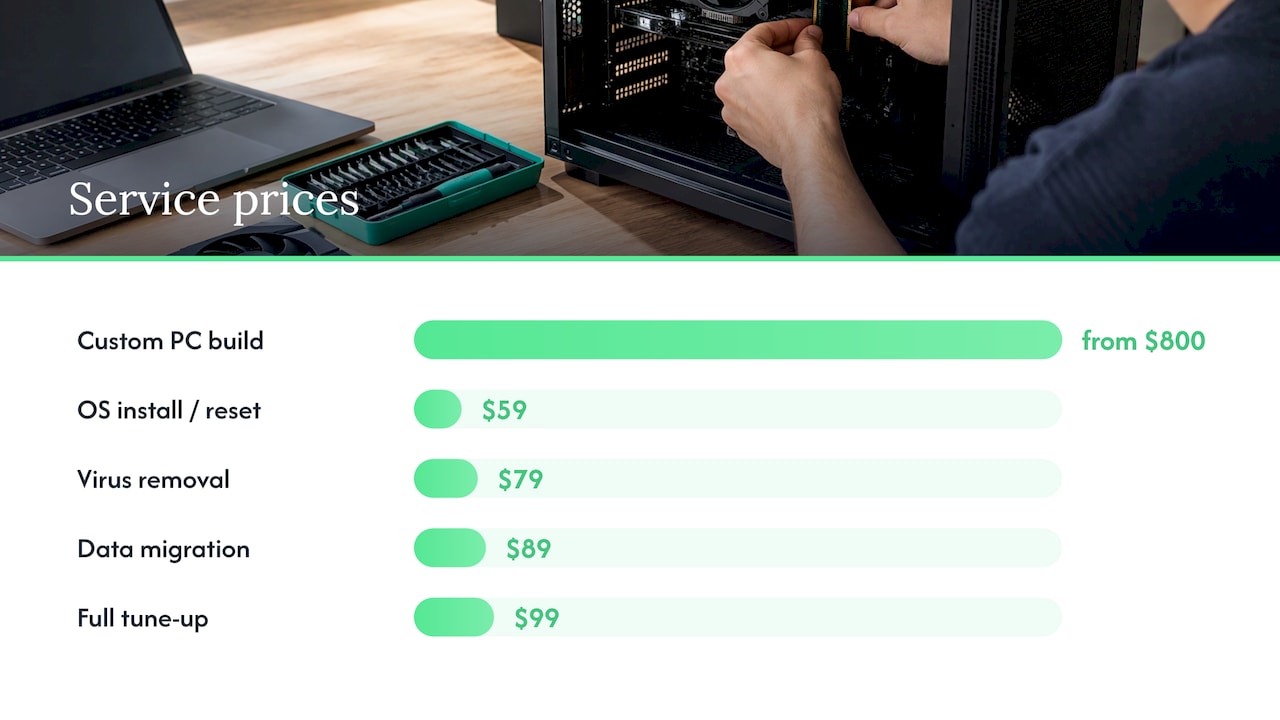
Digiwrld combines hardware sales with repair and custom tech services in one place. Custom PC builds start from $800. The store runs a live inventory system so listed products are in stock, and sells brand new, authentic hardware, including graphics cards such as the RTX 5070 PNY OC 12GB.
Other services that matter to a PC owner:
| Service | Price |
|---|---|
| Custom PC build | from $800 |
| OS install / reset | $59 |
| Virus and malware removal | $79 |
| Data migration (up to 500GB) | $89 |
| Full tune-up + thermal repaste | $99 |
These services are on the Digiwrld home page. Deciding between a PC and a Mac for gaming? Digiwrld’s guide to Mac vs PC gaming covers that choice.
Our view
We built Digiwrld around one idea: buying hardware and getting it working should happen in one place. A PC is not just parts. It is parts plus a correct assembly, a clean OS install, tested temperatures and someone to call afterward.
That is why our shop pairs hardware sales with services. The live inventory means a listed part is a part we have, so a build is not delayed by a surprise out-of-stock. Repairs, software installs and custom builds sit under one roof, so the machine we build is the same machine we can tune up, reinstall or repair later.
Our advice to gamers: decide what the PC must do, set a budget, and let the build be done once and done right. If you want to start from the parts you like, our builds start from $800.
Hayden
Ready to order a build
Digiwrld’s custom PC build service starts from $800 and sits alongside its store, where brand new GPUs, consoles and computers are listed against live inventory. Start on the custom PC build page, and bring your parts list or your target games and budget.

If you already have a machine that needs work, the services on the Digiwrld home page cover OS installs, malware removal, data migration and tune-ups.
FAQ
Is it cheaper to build a PC yourself than to hire someone?
Usually the parts bill is lower because you skip the assembly charge. Digital Trends found a $1,900 pre-assembled system against a $1,500 to $1,700 DIY equivalent, a margin that is not always large. Add your own hours, any tools you need and the cost of a failed part before you call it a saving.
Can I hire someone to build a PC with parts I already bought?
Yes, many builders will assemble customer-supplied parts. Ask in writing what happens if one of your parts is faulty or incompatible, and who is responsible for diagnosing it. For a custom build from Digiwrld, start on the custom PC build page.
Does a self-built PC have a warranty?
Each component carries its own manufacturer warranty, but the build as a whole does not, according to Digital Trends. A build service gives you one provider for the finished system, with terms set out in its written warranty.
How hard is it to build a PC for the first time?
PCWorld calls it daunting but manageable for people who research and follow video guides. The usual trouble spots are static, heavy graphics cards and parts that arrive too far apart to return easily. If you would rather skip those risks, a build service removes them.
Sources
- How to Choose: Pre-Built Vs. Custom PC (Intel)
- Building a PC in 2026 (PCWorld)
- Building your first PC? 5 essential tips (PCWorld)
- Should You Build or Buy Your Next Gaming PC? (Tom’s Hardware)
- Prebuilt vs. custom PC (Digital Trends)
- Build vs Buy a Gaming PC (Kingston)
- Businessperson’s Guide to Federal Warranty Law (FTC)
- Custom PC Assembly Services (LaptopJudge)