SSD vs HDD for Gaming: Which Drive Belongs in Your PC
For a gaming PC in 2026, an SSD is the right drive for the operating system and every game that is played regularly. A hard drive (HDD) still wins on price per terabyte, so it fits bulk storage: recordings, backups and rarely played titles. Games decide the rest. Some recent releases now list an SSD as a minimum requirement and run badly from a hard drive.
This guide covers what the speed difference looks like in real games, what each type costs, how much capacity to buy and where an NVMe drive fits in.
TL;DR
- An SSD loads games many times faster than an HDD. In one 2025 test, Cyberpunk 2077 loaded in 6 seconds on an SSD and 63 seconds on an HDD.
- Storage does not raise average frame rate. It cuts load times and streaming hitches. The CPU and GPU still set FPS.
- Pick a PCIe NVMe SSD. The gap between PCIe 3.0, 4.0 and 5.0 rarely shows up in games.
- 1TB is the practical floor for a modern gaming PC, and 2TB is the common sweet spot. An HDD works as a secondary drive for bulk files.
- Use one fast drive for the OS and active games, and move older titles to cheaper storage.
Table of Contents
- How SSDs and HDDs differ
- Load times: where the gap is largest
- Does an SSD raise FPS?
- Cost: what the gap looks like now
- NVMe or SATA SSD
- How much SSD space gaming needs
- When an HDD still makes sense
- Setting up the drive: OS, migration and build
- Promo: a gaming PC built around the right storage
- Our view on storage
- FAQ
- Sources
How SSDs and HDDs differ
An HDD stores data on spinning magnetic platters read by a moving head. Its speed depends largely on spindle speed, which runs from 5,400 to 15,000 RPM, with 7,200 the common figure for desktop drives, according to Intel’s gaming storage guide. An SSD uses flash memory with no moving parts. That gives it faster reads and writes, much lower access times and a higher cost per gigabyte.
The practical split is simple:
| HDD | SATA SSD | NVMe SSD | |
|---|---|---|---|
| Moving parts | Yes | No | No |
| Typical sequential read | 160–220 MB/s | about 550 MB/s | 3,500–7,400 MB/s |
| Cost per terabyte | Lowest | Middle | Highest |
| Best use | Bulk storage, backups | Upgrades to older systems | Main gaming drive |
The speed ranges come from a storage pricing guide updated in October 2026. NVMe is a protocol that connects the drive straight to the motherboard’s PCIe lanes. It delivers more throughput and lower latency than the older SATA connection, per Intel.
Load times: where the gap is largest
Load times are where an SSD pays off. PCWorld’s February 2025 test compared a WD Black SN770 SSD with a Seagate BarraCuda HDD:
- Marvel Rivals: 8 seconds on the SSD, 67 seconds on the HDD.
- Cyberpunk 2077: 6 seconds on the SSD, 63 seconds on the HDD.
- Warhammer: Vermintide 2: 14 seconds on the SSD, 22 seconds on the HDD.
The gap depends on the game. Heavily streamed, asset-rich titles suffer most. TechSpot’s August 2025 testing found Kingdom Come: Deliverance II taking more than four minutes to load from hard drives, and the game itself warns against them. Cyberpunk 2077 save reloads ran up to 3.8 times slower on HDDs.
Smaller games show a smaller gap. In PC Gamer’s 2021 comparison, the fastest SSD shaved only about five seconds off the slowest HDD in indie titles. Older tests also show narrower gaps than current ones, because games have grown much larger since.
Does an SSD raise FPS?
No. Frame rate is tied to the CPU and GPU. Intel states that an SSD upgrade will not increase FPS, but it can reduce hitches in open-world games that stream in new areas and textures. TechRadar makes the same point: a better drive does not make games run at higher frame rates.
What an SSD changes:
- Long loading screens and fast-travel waits shrink.
- Stutter when entering new areas can drop in streaming-heavy games.
- Newer games built around DirectStorage, a Windows feature that lets games request data from fast drives far more efficiently, can design worlds without level sections built to hide loading.
A diagnostic rule helps when a game feels slow. Long loading screens point to storage. A frame rate that is low all the time points to the CPU or GPU. If frame rate is the problem, a graphics card or display upgrade does more, and the 144Hz vs 240Hz guide covers the screen side.
Some titles do show a measurable gap between drive types. In Tom’s Hardware’s 2026 test of 11 games, Forspoken’s 1% low frame rates improved 39% at 4K, 51% at 1440p and 22% at 1080p when moving from SATA to a PCIe SSD. Most other titles showed no meaningful difference.
Cost: what the gap looks like now
Prices move constantly, so read them as snapshots. ratioDB’s live tracker, as of November 23, 2026, put M.2 NVMe SSDs at $128.32 per terabyte, 2.5-inch SATA SSDs at $111.48 per terabyte and internal 3.5-inch hard drives at $33.33 per terabyte. Prices change with NAND supply and demand and shift week to week, so check current listings before buying.
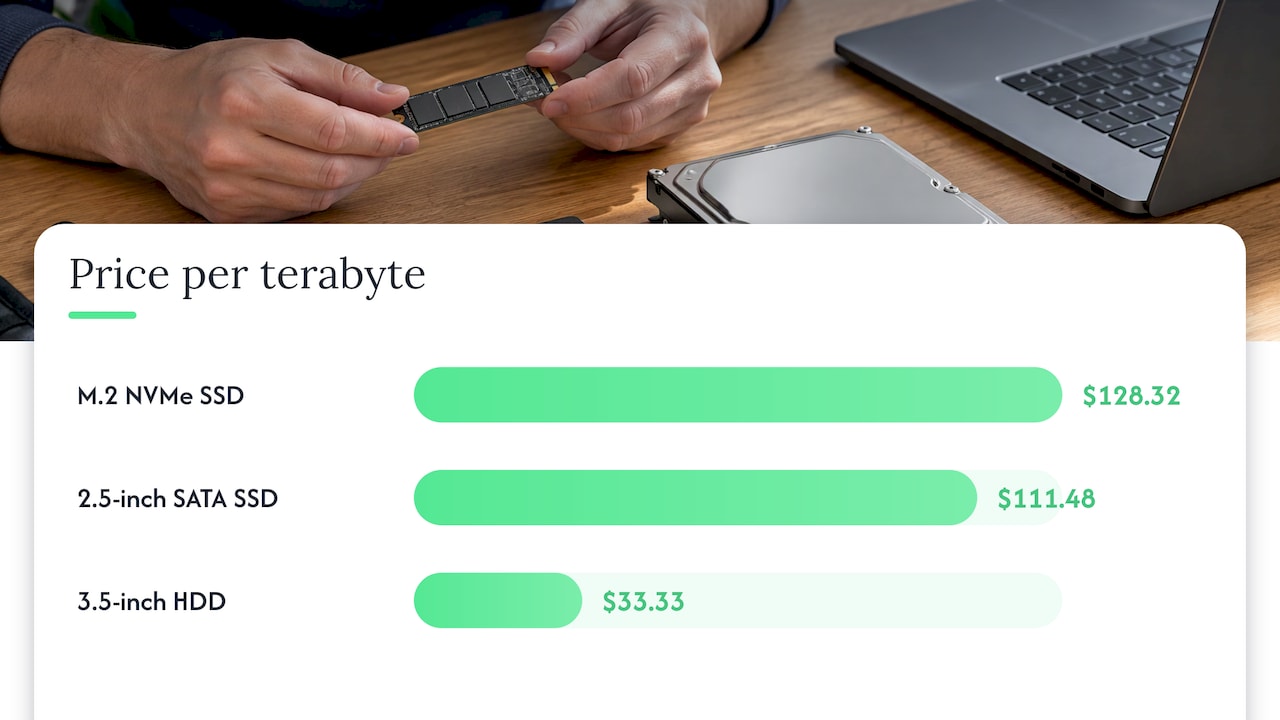
Worked example: a 100GB game costs about $12.83 to store on NVMe at that rate, against roughly $3.33 on an HDD. The HDD is cheaper per gigabyte. But a 2TB NVMe drive is still a modest part of a gaming build, and the HDD’s savings amount to a few dollars per game.
Two further findings from the research:
- PCWorld noted in 2025 that SSD prices were at their lowest, and argued the small price gap is not worth the extra HDD load time.
- TechSpot found PCIe 5.0 drives start at 40% more than PCIe 4.0 at 2TB without a meaningful gaming benefit. Its conclusion: skip the premium for gaming alone.
In short, spend on capacity and a solid PCIe 3.0 or 4.0 NVMe drive, not on the fastest generation.
NVMe or SATA SSD
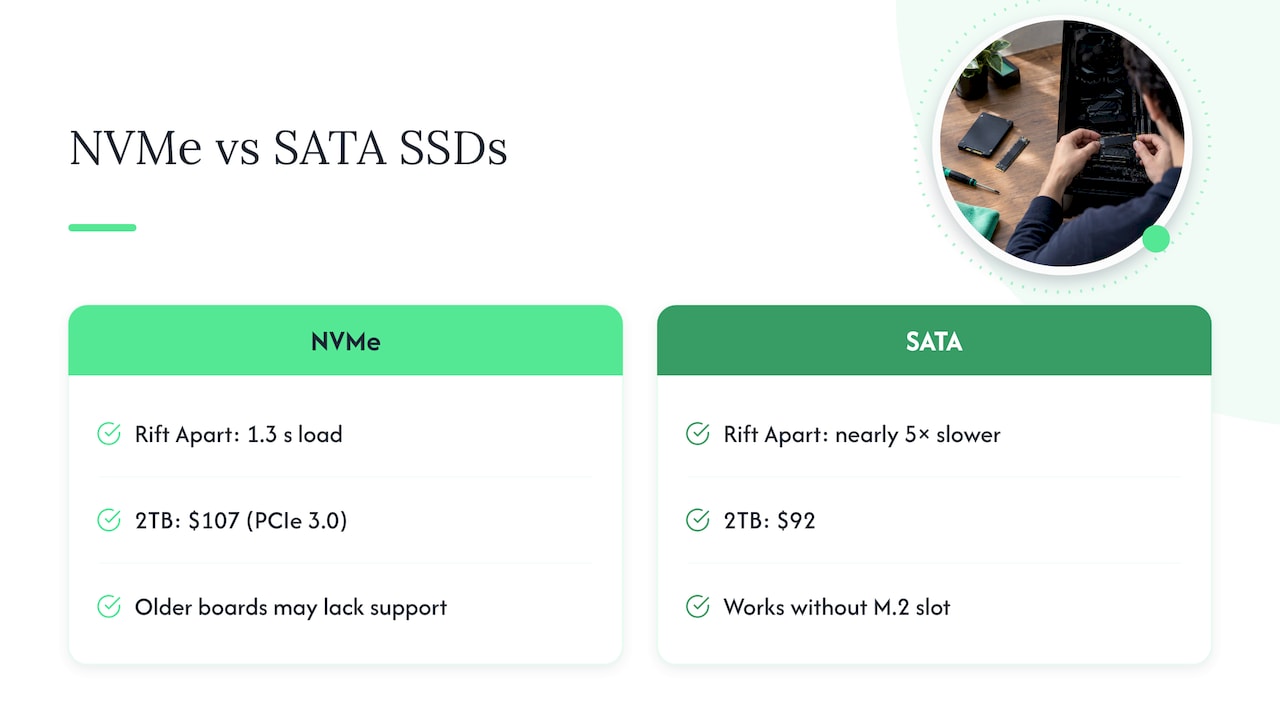
Both are SSDs, and both beat a hard drive by a wide margin. NVMe is faster on paper, and TechSpot’s testing showed it pulling ahead in the most demanding titles: Ratchet & Clank: Rift Apart loaded in 1.3 seconds on PCIe drives and nearly five times slower on SATA.
SATA’s old price advantage has mostly vanished. TechSpot listed a 2TB SATA drive at $92 and a 2TB PCIe 3.0 NVMe at $107 in August 2025. At that gap, NVMe is the default.
There is one compatibility check. Intel warns that older motherboards and BIOS versions may not support NVMe, so confirm the board’s specifications before buying. A board without an M.2 slot takes a SATA SSD instead, which is still a large step up from a hard drive.
Within NVMe, the generation matters little. Tom’s Hardware found no differences between PCIe generations in nearly all games tested. Tech Guided explains why: games rarely read huge sequential files continuously, so random performance, latency, decompression and the CPU all shape load times. A 15,000 MB/s drive does not load games twice as fast as a 7,000 MB/s one.
How much SSD space gaming needs
Games are large. Many AAA titles exceed 100GB and grow with patches and DLC. Windows, launchers and recordings add to that.
How-To Geek’s capacity guidance breaks it down:
- 500GB: an absolute minimum, only for players who avoid AAA games. About 300GB is left for games after Windows.
- 1TB: the floor for a self-built PC.
- 2TB: optimal for the average PC gamer.
- 4TB: suits game hoarders, roughly 50 AAA titles or 100 or more mixed games installed at once.
The reason 1TB falls short is usable space. A 1TB drive shows about 931GB after formatting and loses roughly 7% to overprovisioning. Drives also run best under 80 to 90% full. That leaves about 650 to 830GB usable after the OS, according to How-To Geek’s December 2025 analysis. The same piece found 2TB drives cost less per terabyte than 1TB ones.
Tech Guided recommends starting most 2026 gaming PCs with 2TB, keeping 1TB for budget builds or players who keep only a few games installed. It also prefers one 2TB drive over two 1TB drives, which keeps an M.2 slot free and simplifies management.
So, is 2TB overkill? For a player with several AAA titles, recordings and a growing library, it is the practical size. For someone who plays two or three games at a time, 1TB works.
On the other common question: a 256GB SSD against a 1TB hard drive. The 256GB drive loads games faster but fits only a few of them after Windows. It suits an OS drive, not a library. A 1TB SSD is the smallest size that holds a library comfortably.
When an HDD still makes sense
The SSD should hold the operating system, launchers and games in regular rotation. A hard drive fits alongside it for:
- Video files, game captures and backups.
- Long-term storage of older or finished games.
- Moving games between drives through Steam or the Xbox app instead of re-downloading them, as How-To Geek notes.
HDD economics improve with size. A guide updated in October 2026 puts 8TB drives at roughly $15 to $18 per terabyte, against $40 to $55 for a 1TB hard drive. This is bulk storage, not a gaming drive.
A practical setup for most builds: one 1TB to 2TB NVMe SSD for the OS and current games, plus an optional large HDD for everything else.
Setting up the drive: OS, migration and build
A new SSD has to be set up properly. Windows has to be installed on it or cloned across, and game libraries have to move without re-downloading hundreds of gigabytes.
Digiwrld lists these services at published prices:
- OS install / reset: $59.
- Data migration, up to 500GB: $89.
- Full tune-up with thermal repaste: $99.
- Virus and malware removal: $79.
Mail-in service is available for $10, and shipping is $12 per item. House-call device repairs are offered in Corpus Christi, TX, on the repairs page.
Promo: a gaming PC built around the right storage
For players choosing storage as part of a new system, Digiwrld offers custom PC builds from $800. The Gaming Bays page covers the build service. For the other services above, including OS installs and data migration, see digiwrld.com.

Digiwrld’s inventory runs on a live system, so listed products are in stock, and all products are brand new and authentic. That includes the graphics cards that decide frame rate, such as the RTX 5070 PNY OC 12GB.
Our view on storage
Storage is the cheapest upgrade that players feel every session. Nobody notices a drive while a game runs. They notice it at every loading screen, fast travel and menu.
Our advice follows the evidence above. Put the operating system and the games in rotation on a PCIe NVMe SSD. Choose 2TB when the budget allows. Spend on capacity before spending on the newest PCIe generation. Keep a hard drive only for bulk files.
The other half is setup. A fast drive helps only when Windows and the game library sit on it. That is why we offer OS installs, data migration, tune-ups and custom builds alongside the hardware itself: one place for the parts and the work.
Hayden
FAQ
Is it better to install games on an SSD or a hard drive?
An SSD. Load times fall from about a minute to a few seconds in some titles, and several new releases list an SSD as a minimum requirement. A hard drive is better kept for older games, captures and backups.
Is an SSD better for gaming even if the frame rate stays the same?
Yes. An SSD does not raise average FPS, since the CPU and GPU control that. It shortens loading screens and can reduce stutter when open-world games stream new areas.
Is a 256GB SSD better than a 1TB hard drive?
It loads games faster, but it fills quickly. After Windows, a 256GB drive leaves room for only a few large games. A 1TB SSD is the smallest size that holds a library comfortably, and 2TB is the common choice for AAA players.
Is 2TB of SSD overkill for gaming?
No, for most players with several AAA titles installed. Many of those games exceed 100GB, and a 1TB drive leaves roughly 650 to 830GB usable after formatting, the OS and free-space headroom. Players who keep only a few games installed can use 1TB.
Sources
- Intel: HDD vs SSD for gaming
- Intel: How SSDs impact gaming
- PCWorld: PC gaming on SSDs vs. HDDs, tested
- TechSpot: SSD gaming comparison and load times
- Tom’s Hardware: impact of SSD speed on gaming performance
- TechRadar: Do you really need an SSD for gaming?
- PC Gamer: HDD vs SSD
- How-To Geek: how much storage PC gaming needs
- How-To Geek: why 1TB SSDs fall short
- Tech Guided: best SSDs for gaming in 2026
- ratioDB: SSD for gaming pricing
- Gaming PC Guru: 1TB SSD vs 1TB HDD